

Latest Version
Luca Dibattista
Travel & Local
Windows
Free
9n9cg0gmdbl2
Report a Problem
More About Vibe Tray
The Frustration of Hitting AI Rate Limits Mid-Task
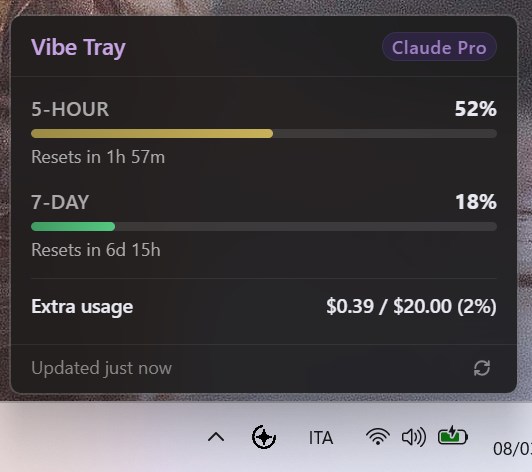
Picture this: you are deep in a flow state, refactoring a complex codebase or drafting a high-priority technical document with Claude. Suddenly, your momentum grinds to a halt. You have hit your Anthropic rate limit, and you did not see it coming. To prevent this, you would normally have to open a browser tab, log into a dashboard, and manually check your status. The Vibe Tray Claude AI usage tracker eleganty solves this friction point by bringing your usage metrics directly to your Windows desktop.
What is Vibe Tray?
Developed by Luca Dibattista, Vibe Tray is a lightweight, specialized Windows utility designed for power users who rely heavily on Anthropic's ecosystem. Instead of forcing you to navigate away from your active workspace, this tool sits quietly in your system tray. A single click on the tray icon instantly reveals exactly how much of your Claude quota remains, allowing you to manage your daily workflow with complete predictability.
Key Features and Requirements
- Instant Desktop Visibility: Monitor your active Claude resource allocation without keeping browser tabs open.
- Zero-Data Privacy Architecture: The utility functions with absolute privacy. There is no telemetry, no tracking, and no external backend servers; all API communication occurs directly between your local machine and Anthropic.
- Seamless System Integration: Designed specifically for the Windows platform, integrating naturally with your taskbar.
Important Compatibility Notes
Before integrating the Vibe Tray Claude AI usage tracker into your daily routine, it is vital to note the technical prerequisites. This utility is not a standalone application. It requires Claude Code to be installed, configured, and actively signed in on your local machine to pull the necessary usage data.
Who is This Tool For?
If you only use Claude occasionally for casual queries, you might not need to monitor your limits. However, for software engineers, technical writers, and researchers who push the boundaries of their daily quotas, this app is an invaluable workflow optimizer. It eliminates the guesswork of resource management, ensuring you can budget your complex prompts before starting a heavy computational task.
Our Verdict: A Must-Have for Power Users
Vibe Tray does one thing and does it exceptionally well. By removing the friction of quota monitoring, it helps you maintain your focus where it belongs: on your work. To integrate this utility into your development environment, visit the official Microsoft Store to download the application directly from the verified publisher.
Rate the App
User Reviews






Popular Apps









Editor's Choice